
How to purchase ATLAS.ti
Key takeaways
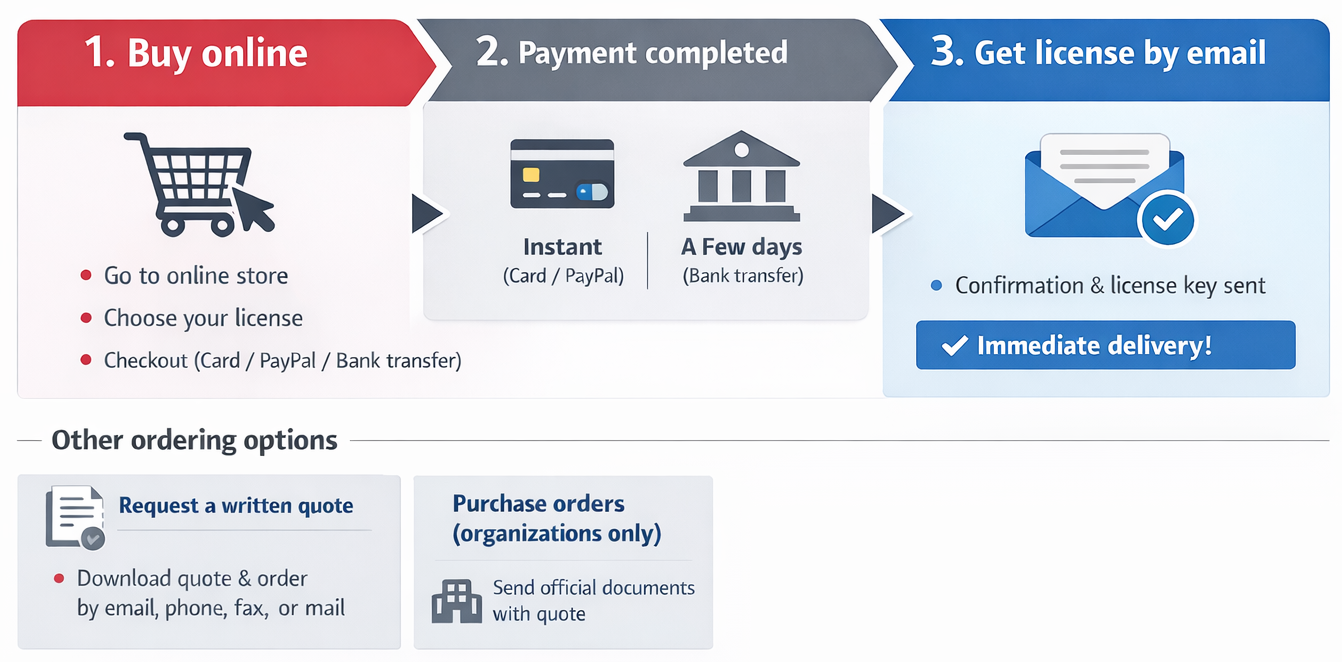
- ATLAS.ti licenses can be purchased directly through the online store using common payment methods.
- You can get started right away with a free trial, and then continue with your project(s) with your purchased license.
- If you need to place an order outside the online store, you can first request a written price quote.
- Orders can also be placed by email, mail, phone, or fax using the generated quote.
- Purchase orders are accepted from businesses, educational institutions, and government organizations.
- All sales and order processing are handled by Cleverbridge, the official ATLAS.ti sales partner.
Who this article is for
This article is for customers who want to purchase an ATLAS.ti license and would like to understand the available ordering methods, including online purchases, written quotes, and institutional purchase orders.
How to purchase ATLAS.ti
- Go to the ATLAS.ti online store.
- Select the license that best fits your needs.
- If you are not sure which license is most suitable for you, please see this page or contact our support here.
- Add the selected product to your cart.
- Proceed to checkout.
- Enter your billing details and choose a payment method (credit card, PayPal, or bank transfer).
- You can purchase a license on behalf of someone else (the only exception is the student license, which must be purchased by the student themselves)
- Complete the payment.
- After purchase, you will receive a confirmation email with your license details.
For a step-by-step walkthrough of the purchasing process, please refer to the video tutorial below.

Accepted payment methods
You can select any of the following payment methods:
- Visa, MasterCard, American Express, JCB and Discover credit cards
- PayPal
- Wire/bank transfer
- Purchase order (Purchase orders are only available to corporate customers)
- SEPA Direct debit
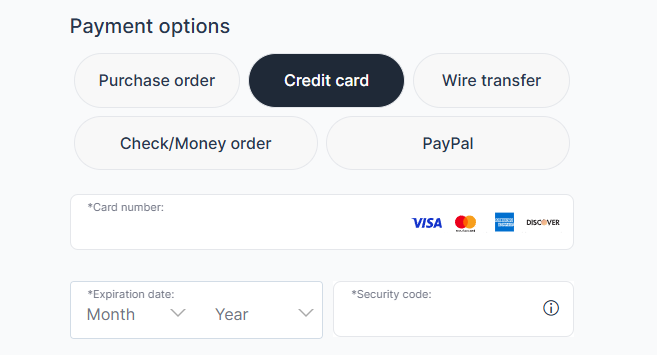
The available payment methods will be shown in the Shopping Cart after you select a license in our online shop. Once you choose a payment method, further instructions will be provided.
Your products will be delivered to you electronically (via email) as soon as the payment is received:
- If you pay with a credit/debit card, you will receive your products almost immediately
- If you pay with a wire/bank transfer, it may take a few business days for the payment to be received
Written quote
You would like to place your order by phone, fax or email rather than online? No problem, but you should first obtain a written quote. Only a few simple steps are necessary:
- Select your desired product from the shop
- In the Shopping Cart, click “Request Price Quote”
- Complete the form.
- The written quote will be available right away for download as a .pdf document. It will also be sent to via email. The written quote is good for 60 days.
- Print out the document, if sending by mail or fax.
- Send the document by mail, fax or email to our our sales partner, Cleverbridge Inc. Their full contact channels are listed below.
For a detailed, step-by-step explanation on how to request an official ATLAS.ti quote, please refer to the video tutorial below.

Ordering by mail, phone, or fax
- Create a written quote (see above)
- Fax or mail this quote to our sales partner, Cleverbridge Inc. Their various contact channels are listed below
If ordering educational licenses, please see our Terms and Conditions
Purchase orders
Purchase orders are accepted from businesses (except resellers), educational, and government institutions. Placing a purchase order is simple and straight-forward. Please proceed as follows:
- Create a written quote.
- Fax or mail this quote to our sales partner, cleverbridge Inc.
- Indicate clearly that you wish to place a purchase on official letterhead and/or accompanied by an official institutional order form. Send this form or letter along with your written quote to our sales partner, Cleverbridge.
With a purchase order, you will receive the products immediately, i.e. prior to payment being received, accompanied by an official invoice. Orders are payable within 30 days. Please note that the invoice is issued by our sales partner Cleverbridge Inc.
Important: Purchase orders are not accepted for orders by individuals or for student licenses.
Vendor and W-9 Form
Please note that all purchases are transacted by our sales partner Cleverbridge Inc. Find their vendor data and W-9 forms here (PDF).
For a W-9 form, write to Cleverbridge Inc at payments-us@cleverbridge.com
Common issues or mistakes
-
Trying to place a purchase order as an individual
Purchase orders are only accepted from organizations (businesses, universities, government institutions), not individuals or student licenses.
-
Skipping the written quote step
When ordering by email, phone, fax, or mail, a written quote must be created first—orders cannot be processed without it.
-
Quote expired before ordering
Written quotes are only valid for 60 days. Using an expired quote can delay or prevent order processing.
-
Not sending official documents with purchase orders
Institutional orders must include official letterhead or an official purchase order form—missing this can lead to rejection.
-
Expecting ATLAS.ti support to handle payments or invoices
All sales, payments, invoices, and refunds are handled by Cleverbridge, not ATLAS.ti support.
-
Entering incorrect email during purchase
This can result in not receiving the license key or confirmation email.
-
Not checking spam/junk folder for order confirmation
Emails from Cleverbridge may be filtered, especially in institutional environments.
-
Confusion about payment methods
Some payment methods (like bank transfer) may take longer to process compared to instant methods like credit card or PayPal.
When to contact support
All orders for ATLAS.ti products and all order-related issues (such as payment, shipment, refunds) are handled by our sales fulfillment partner, Cleverbridge AG.
Please click here to access the Cleverbridge Support Center.
You can reach out to Cleverbridge if:
- You placed an order but did not receive your license key or confirmation email.
- You need assistance with an existing order, receiving your invoice, or quote.
- You have questions about purchase orders or institutional ordering requirements.
- You encounter issues while requesting or downloading a written quote.
To contact the Cleverbridge AG Customer Center by email: cs@cleverbridge.com
Cleverbridge Customer Support contact form: https://support.cleverbridge.com/hc/en-us/requests/new