
How to purchase ATLAS.ti: Student licenses
Key takeaways
- Students can purchase a student license and begin using ATLAS.ti right away.
- Documents showing valid proof of current student status must be uploaded within 5 days after purchase.
- Student licenses provide full access to all ATLAS.ti features and tools, the same as any other license type.

Who this article is for
Undergraduate, graduate, or doctoral students who purchased (or want to purchase) an ATLAS.ti student license, and students who need to verify their student status after purchase.
How to purchase use an ATLAS.ti Student License
ATLAS.ti offers a specially priced student license that allows undergraduate, graduate, and doctoral students to use the full version of the software for their degree studies.
1. Purchase the student license and start using ATLAS.ti
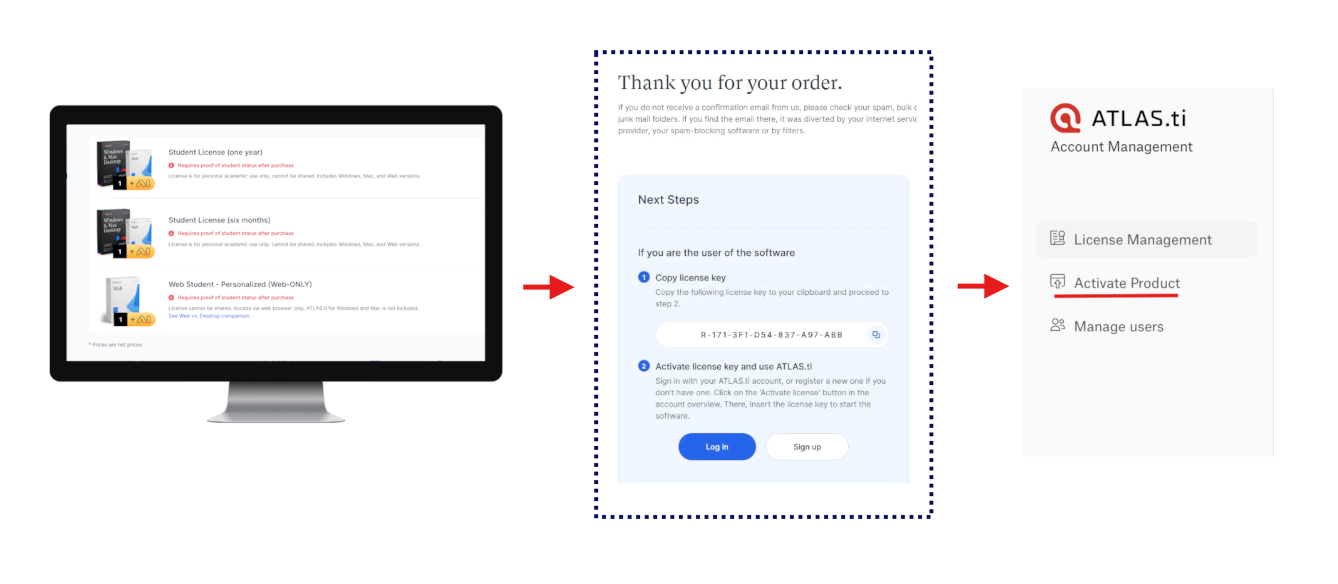
- Purchase the student license from the ATLAS.ti online store
- As soon as the payment is received, your license details will be sent to you by email from no-reply@cleverbridge.com (for example, if you pay with a credit/debit card, the license will be sent almost immediately)
-
Activate your license and start using ATLAS.ti right away, even before your student status is verified. Just open my.atlasti.com, click on "Activate Product" and paste your License Key.
2. Upload your verification documents (within 5 days)
-
Upload proof of your student status in your My ATLAS.ti account page
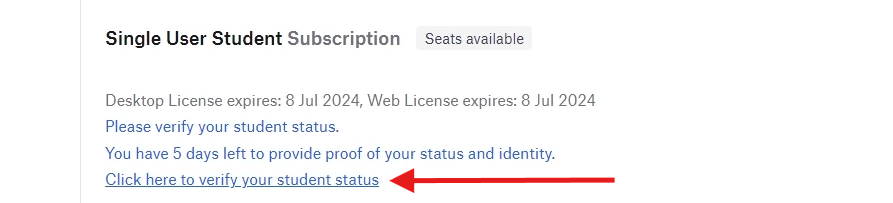
- Upload the following documents:
- A scan of your valid student ID or an official document confirming enrollment at an accredited higher-education institution
- A second official photo ID (passport or government ID) with the same name
- Documents must be uploaded within 5 days of purchase, otherwise the license will automatically expire
3. Wait for verification
The ATLAS.ti team will review your documents and send you an email (usually within 24 hours on weekdays) confirming whether:
- Your documents were approved
- Your documents were rejected
- Additional documents are required

Full access to all ATLAS.ti features
- Student licenses provide exactly the same functionality as other ATLAS.ti licenses.
- There are no feature limitations—you can use all tools and features available in the software.
Common issues or mistakes
I want to use my student license for other research or work.
This is not possible. A student license can only be used for the license holder’s own degree studies. It cannot be used for:
- Faculty or institutional research projects
- Consulting or commercial work
- Third-party research projects
If you need to use ATLAS.ti outside your degree studies, you will need a different license type.
A university or institution wishes to buy student licenses for students.
This is not possible. Student licenses are only for individual students and cannot be purchased or held by institutions.
If a university wants to provide ATLAS.ti access to students, they should contact ATLAS.ti Support about campus or institutional licenses.
My student license expired after purchase.
This usually happens when verification documents were not uploaded within 5 days.
My verification was rejected.
Make sure the uploaded documents clearly show:
- Your name
- Your current enrollment status
- The same name on both documents
When to contact support
Contact ATLAS.ti support if:
- You uploaded documents but did not receive a verification email
- Your license expired before verification
- You are unsure which license type you need
- You are a representative from a university or institution that wants to provide ATLAS.ti access to your students