
Transfer your license to another account
Key takeaways
- Licenses are linked to the ATLAS.ti account used during activation.
- If you activated a license or invitation code using the wrong account, you may transfer it by changing the email address associated with the account.
- Administrators who want to change the administrator account must request the license to be released and reactivated under another account.
- Some licenses, such as personal licenses (e.g., student licenses), cannot be transferred to another user's account.

Who this article is for
Anyone who activated an ATLAS.ti license or invitation code under the wrong account, or administrators who need to move a license to a different ATLAS.ti account.
How license transfers work
Licenses are normally tied to the ATLAS.ti account used during activation. If the license was activated under the wrong account, the way to transfer it depends on the situation.
Scenario 1 – You activated the license under the wrong account
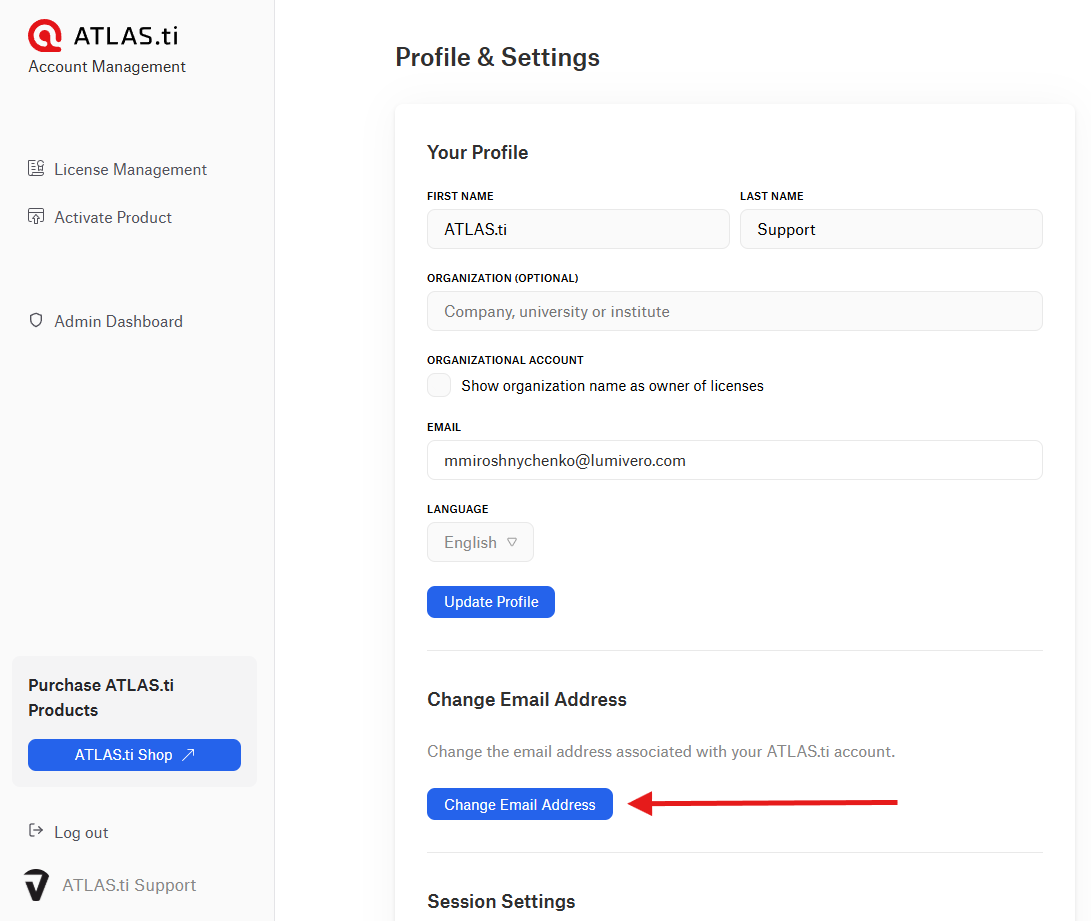
If you activated a license key or invitation code under the wrong ATLAS.ti account, and you simply want to change the account email, you can do this by changing the email address associated with the account. To do this:
- Sign in to my.atlasti.com
- Go to Profile & Settings.
- Select Change Email Address.
-
Enter the new email address and confirm the change using the verification email.
Scenario 2 – Switching between a personal email and an organizational email
If you previously activated and used your license with your organizational email address but would like to switch to a personal email address (or vice versa), you can update the email associated with your ATLAS.ti account.
The process is the same as described in Scenario 1. Simply change the email address in Profile & Settings in your ATLAS.ti account.
Scenario 3 – Changing the administrator account for a license
If you are the administrator of a license and want to change the administrator account, the license must be released and reactivated under another account. In this case:
- Create or confirm the new ATLAS.ti account that will become the administrator account.
- Contact ATLAS.ti Support and request the license to be released from the current account.
- After the license is released, activate it again in my.atlasti.com using the license key under the new account.
- Important — Before requesting this change, make sure that:
- All invited users have saved their projects.
- Users will need to be invited again to the license after the transfer.
Common issues and Mistakes
- Trying to transfer a personal license between two different users
- Personal licenses (such as student licenses) cannot be transferred to another person's account.
- Using an email address that is already linked to another ATLAS.ti account
- When changing the email address associated with your license using Change Email Address, the new email must not already be registered to another ATLAS.ti account. If the email you want to use is already associated with an account, the change cannot be completed automatically. In this case, please contact ATLAS.ti Support for assistance.
- Not creating the new administrator account before requesting the transfer
- If you want to change the administrator account for a license, make sure the new administrator has already created an ATLAS.ti account before requesting the transfer. Having the new account ready will help ensure the license transfer process can be completed smoothly.
When to contact support
Contact ATLAS.ti Support if:
- You need to transfer a license to another administrator account.
- The license was activated under the wrong account and cannot be corrected by changing the email address.
- You are unsure whether your license can be transferred.
When contacting support, please include:
- The email address of the current ATLAS.ti account
- The email address of the new ATLAS.ti account
- Your license key or reference number from the purchase
- A description of the request