
Manage your ATLAS.ti account
Key takeaways
- An ATLAS.ti account is required to use ATLAS.ti, activate licenses, and access the My ATLAS.ti portal.
- In My ATLAS.ti, you can manage your account settings, including changing your email address, changing the display language, updating your password, and resetting a forgotten password.
- Accounts cannot be deleted directly by users. If you want your account deleted, please contact ATLAS.ti Support.
Who this article is for
Anyone who has an ATLAS.ti account, or needs one to use ATLAS.ti, and wants to manage their account settings, such as updating their email address, changing their password, accessing the My ATLAS.ti portal, or recovering access to their account.
Access your ATLAS.ti account
To access your ATLAS.ti account, go to my.atlasti.com
- If you do not have an account yet, click Sign up, create your account, and verify your email address.
- If you already have an account, click Sign in and enter your login credentials.
Change your email address
How you change the email address depends on what needs to be updated - either the email address associated with your ATLAS.ti account (personal account) or the administrator email for a license:
-
Change the email address associated with your personal ATLAS.ti account.
To update the email address linked to your ATLAS.ti account:
- Go to my.atlasti.com
- Open Profile & Settings.
- Click Change Email Address.
- Enter your new email address.
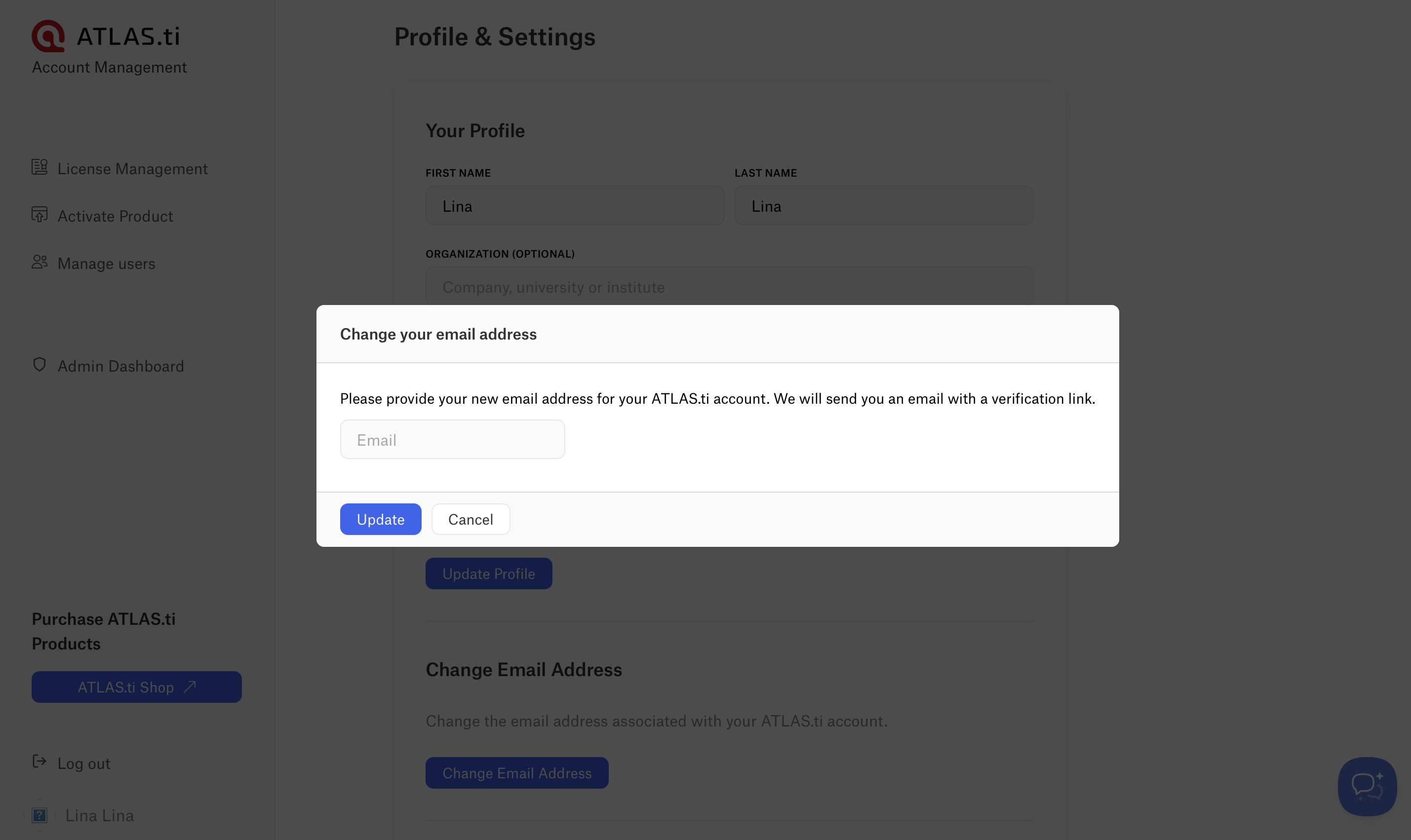
- Confirm the change using the verification link sent to your new email address.
Note: The new email address must not already be associated with another ATLAS.ti account.
-
Change the administrator email for a license
If you need to change the administrator email for a license or campus license, the license must be moved to another ATLAS.ti account. In this case:
- Contact ATLAS.ti Support to request the change in administrator email, and the team will release the license from the current account.
- You can then activate the license key under another ATLAS.ti account at my.atlasti.com
- Before requesting this change:
- Users invited to the current administrator account must be invited again to the new administrator account.
- Make sure all invited users have saved their projects before the change.
Change your password
You can update your password anytime from your account settings.
- Log in to my.atlasti.com
- Open Profile & Settings.
- Select Reset password.
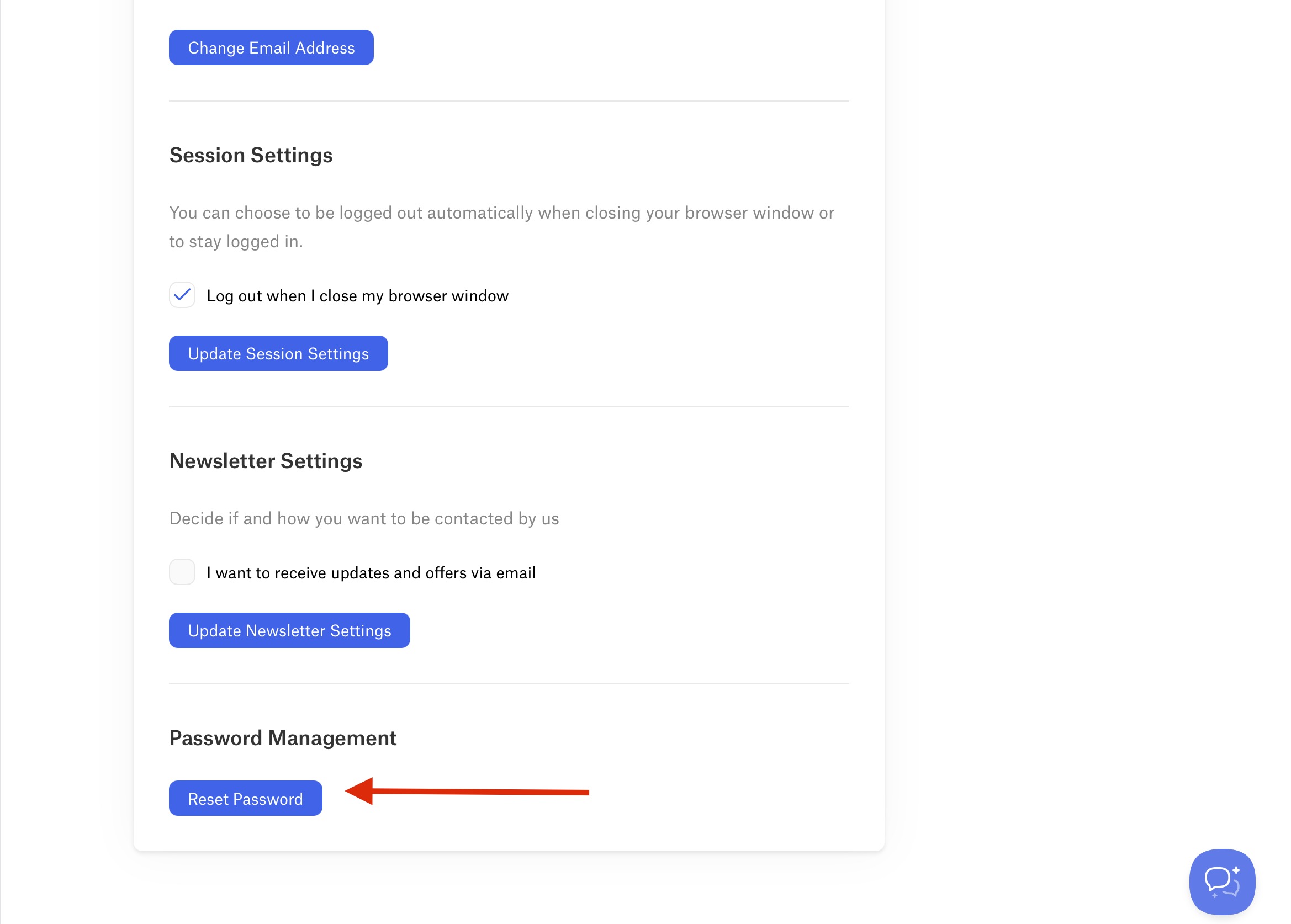
- You will receive an email with a link to reset your password.
- Click "Reset Password" button or copy paste the link into your browser.
- Enter your new password, re-enter it to confirm, and click Reset password.
Forgot password
If you cannot access your account because you forgot your password:
- Go to the my.atlasti.com
- Click Forgot password.

- Enter the email address associated with your account.
- Follow the instructions in the password reset email.
Change the display language of your ATLAS.ti account
To change the portal language in your account:
- Login at my.atlasti.com
- Go to Profile & Settings
- Select your preferred language: English, German, and Spanish
Delete your ATLAS.ti account
Users cannot delete their ATLAS.ti account directly from the portal. To request account deletion:
- Send an email from the same address used to register your ATLAS.ti account to: general@support.atlasti.com
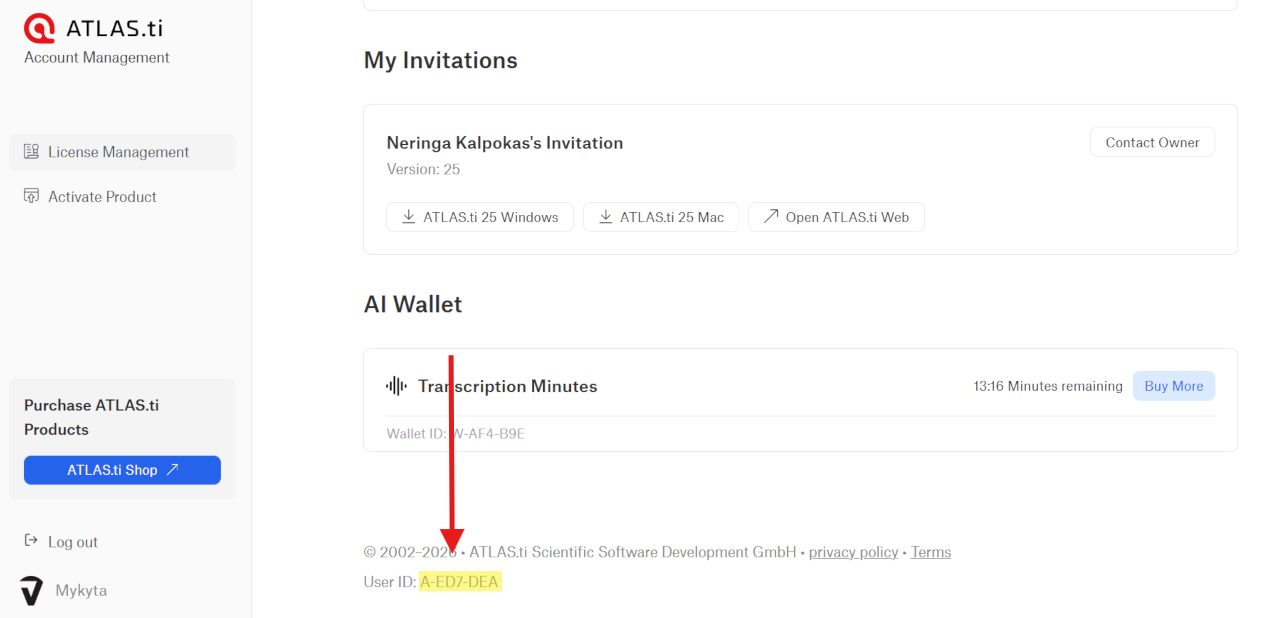
- Please include your ATLAS.ti User ID (format: A-XXX-XXX, starting with the letter “A”). You can find your User ID by logging in to my.atlasti.com and scrolling to the bottom of the page. See the screenshot below for reference, which shows exactly where the ID is located.
Once we receive your request, we will permanently delete your account. This will also erase all associated data, including any projects stored in web.atlasti.com. This action cannot be undone.
Common issues and mistakes
- I cannot access my account
- Use the Forgot password option on the login page to reset your password.
- I did not receive the confirmation email or password reset email
- First, check your spam or junk folder.
- If the email is not in your inbox or spam folder, it may have been blocked by your email provider (company, university, or internet provider) before reaching your mailbox. In rare cases, email delivery may take up to 12 hours due to anti-spam filters.
- If you still have not received the email after 24 hours, contact ATLAS.ti Support so we can manually validate your email address.
- My new email address is not accepted
- If this happens, it is likely your new email address is already associated with another ATLAS.ti account. When changing the email of an ATLAS.ti account, it cannot already be associated with another account.
- The portal is not in my language
- The My ATLAS.ti portal is currently available in English, German, and Spanish. You can change the portal language in Profile & Settings.
When to contact support
Contact ATLAS.ti Support if:
- You cannot access your account even after resetting your password.
- You need to change the administrator email for a license.
- You want to delete your ATLAS.ti account.
- You did not receive the confirmation or password reset email after 24 hours.
If you contact ATLAS.ti Support, please include:
- The email address associated with your ATLAS.ti account
- A description of your request or issue
- Screenshots, if relevant