
How to measure inter-coder agreement in ATLAS.ti
Key Takeaways
- Inter-coder agreement (ICA) is available in ATLAS.ti Desktop for Windows and Mac.
- ICA is not supported in ATLAS.ti Web.
- ICA can be calculated for:
- Text documents
- Audio documents
- Video documents
- Image documents are currently not supported for ICA analysis.
- ICA workflows require all coders to work from the same Master Project and use the same code system.
- ATLAS.ti supports multiple agreement measurements, including:
- Percent Agreement
- Holsti Index
- Krippendorff’s Alpha coefficients
Who this article is for
Anyone working collaboratively in ATLAS.ti who wants to measure coding consistency and reliability between multiple coders using ATLAS.ti Desktop for Windows or Mac.
How Inter-Coder Agreement (ICA) works in ATLAS.ti
Inter-coder agreement (ICA) measures how consistently multiple coders apply codes to the same data. ICA analysis is commonly used in collaborative qualitative research to evaluate coding reliability.
ATLAS.ti Desktop (Windows and Mac) includes built-in ICA tools that allow teams to compare coding decisions across:
- Text documents
- Audio documents
- Video documents
ATLAS.ti Web currently does not support ICA analysis.
How to prepare a project for ICA analysis
Before running ICA, create a clean Master Project. This is the original project that contains the documents, code system, and code definitions that all coders will use.
The project administrator or principal investigator should:
- Create the code system
- Add clear definitions for each code using code comments or memos
- Add the documents that should be coded
- Decide whether coders should:
- Create their own quotations, or
- Work with predefined quotations
- Create copies of the Master Project for each coder
- Export the project bundle and distribute it to the coders
We recommend running ICA only after the code system has been reviewed and stabilized.
For best results:
- All coders should work from the same Master Project
- All collaborators should use the same ATLAS.ti version
- Coders should not modify the code structure independently
- Coding should be completed independently before merging projects
The person who developed the code system should ideally not be one of the coders included in the ICA calculation.
How coders should work on the project
Each coder should work independently using their own copy of the Master Project.
ATLAS.ti Windows and Mac
- Import the project bundle received from the administrator
- Rename the project to include your name or initials
- Verify your username in ATLAS.ti settings
- Apply codes according to the agreed coding guidelines
- Avoid:
- Editing the document
- Uploading the document
- Renaming codes
- Changing code colors
- Editing the code structure
- Save and export your coded project bundle
- Send the coded project back to the project administrator
Coders should not discuss coding decisions during the ICA process, as ICA measures independent coding consistency
Important: Work on the same project copy to avoid duplicated documents
If multiple team members will code the same documents, everyone should work from the exact same project copy.
Recommended workflow:
- One person creates the project and adds all documents.
- The project is exported and shared with the team.
- Each team member imports that project and works in there.
- Upon merging the projects, the documents will not be duplicated.
If each person imports the same files separately on their own computer, ATLAS.ti will treat them as different documents during project merge — even if the files appear identical. The result is duplicated documents after merging.
A note: Duplicate codes are easy to merge, but duplicated documents are much more difficult to fix.
To avoid this issue, always distribute one shared project copy before coding begins.
How to merge projects for ICA
After coding is completed, the project administrator needs to merge the coded projects before running ICA.
ATLAS.ti Windows and Mac
- Import the first coder’s project
- In ATLAS.ti Windows:
- From Welcome screen: Import Project
- From inside an existing project: File > New > Import Project
- In ATLAS.ti Mac:
- From Start screen: Import Project
- From inside an existing project: Project > Import Project
- In ATLAS.ti Windows:
- Create a copy or snapshot of the project
- In ATLAS.ti Windows: File > Snapshot
- In ATLAS.ti Mac: From the start screen, right click on the project name > Duplicate
- Rename the project clearly, for example:
- ICA Project – Coder A and Coder B
- Enable Intercoder Mode
- In ATLAS.ti Windows: Analyse > Enable Intercoder Mode > Enable
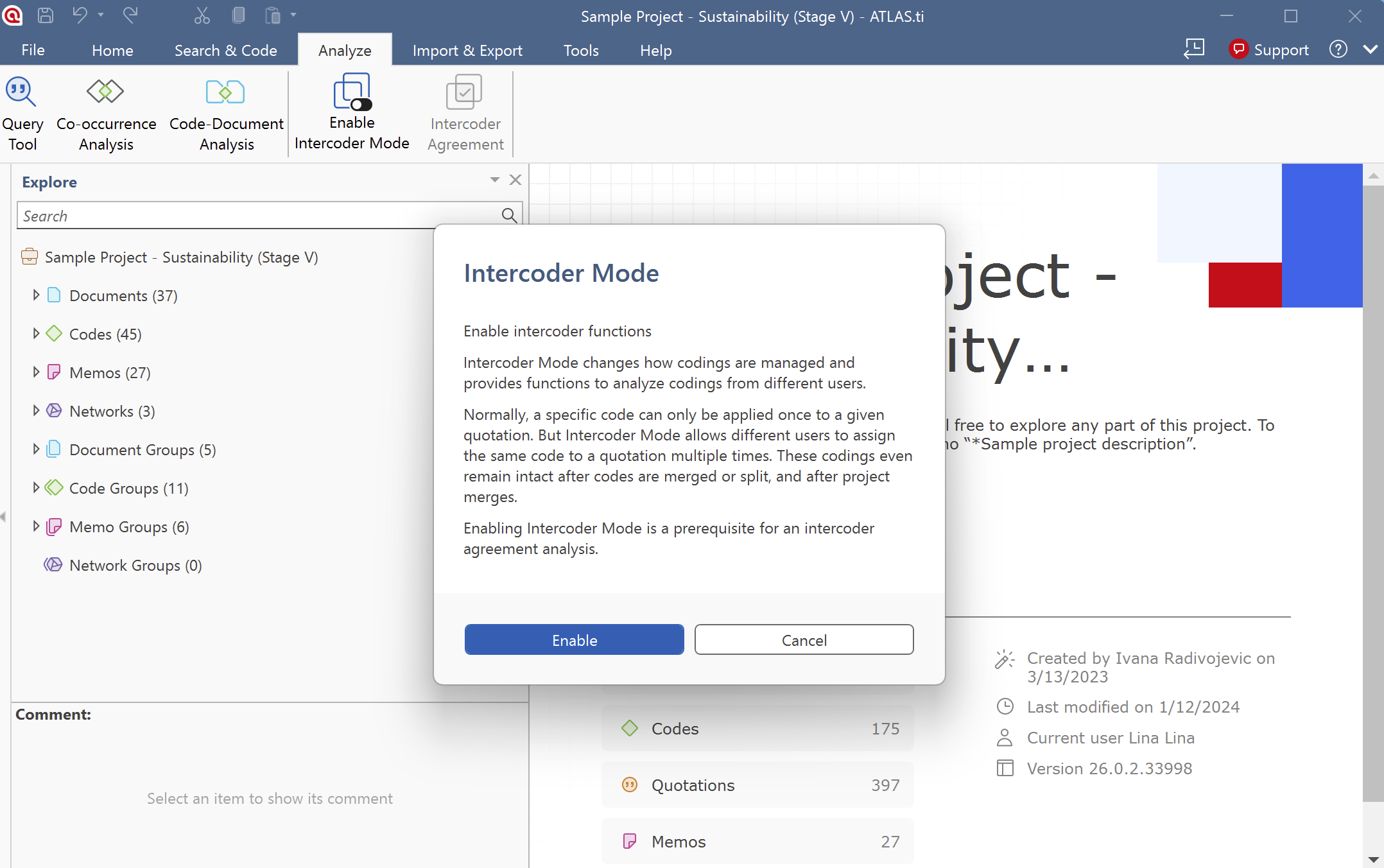
b. In ATLAS.ti Mac: Analysis > Intercoder Agreement mode > Enable
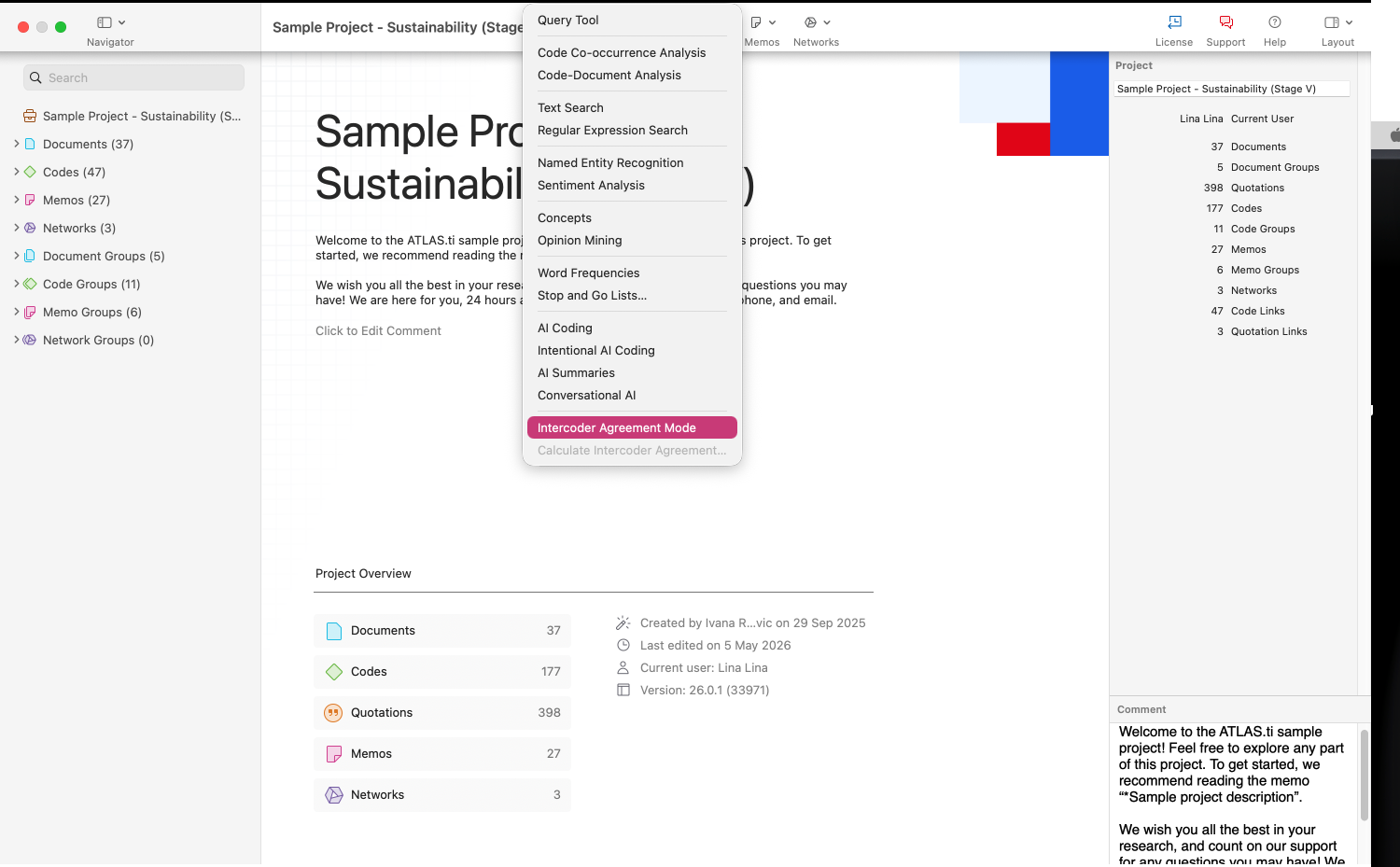
- Merge the second coder’s project into the first project
- Repeat the merge process if additional coders are involved
Please note:
- ATLAS.ti merges two projects at a time
- If multiple coders are involved, repeat the process until all coder projects have been merged
How to run the ICA analysis
Once the projects are merged, you can calculate the inter-coder agreement.
ATLAS.ti Windows
- Open the merged project
- Go to Analyse > Enable Intercoder Mode > Enable
- Add the coders you want to compare
- Select the documents for analysis
- Add the codes or semantic domains
- Select the agreement measurement:
- Percent Agreement
- Holsti Index
- Krippendorff’s Alpha
- Run the analysis
- Review the results
ATLAS.ti Mac
- Open the merged project
- Go to Analysis > Intercoder Agreement mode > Enable
- Select the coders to compare
- Select the documents and codes for the analysis
- Choose the agreement measurement method
- Run the analysis
- Review the ICA coefficients and results
Only documents coded by all selected coders are available for analysis.
How to understand the ICA measurements
ATLAS.ti supports several ICA measurements depending on your research workflow.
-
Percent Agreement
- Percentage Agreement is the simplest measure of inter-coder agreement. It is calculated as the number of times a set of ratings are the same, divided by the total number of units of observation that are rated, multiplied by 100.
- The benefits of percentage agreement are that it is simple to calculate, and it can be used with any type of measurement scale.
- This is how you calculate it:
Percent Agreement (PA) = number of agreements / total number of segments
-
Holsti Index
- The Holsti index is a variation of the percent agreement measure for situations where coders do not code precisely the same data segment. This is the case if coders create their own quotations. Like Percent Agreement, also the Holsti index does not take into account chance agreement.
- The formula for the Holsti Index is:
PA (Holsti) = 2A/ (N1+N2)
- PA (Holsti) represents percentage of agreement between two coders; A is the number of the two coders’ consensus decisions, and N1 and N2 are numbers of decisions the coders have made respectively .
-
The results for Percentage agreement and the Holsti Index are the same when all coders code the same data segments (i.e., the same quotations).
Krippendorff’s Alpha coefficients
-
The family of alpha coefficients offers various measurement that allow you to carry out calculations at different levels. They can be used for more than two coders, are sensitive to different sample sizes and can be used with small samples as well.
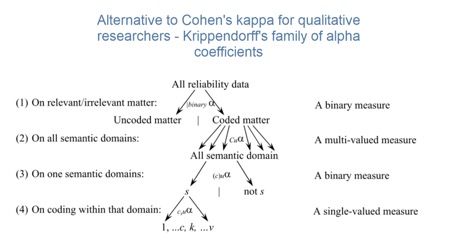
Krippendorff’s family of alpha coefficients – from the general to the specific
Krippendorff’s Alpha binary
- At the most general level, you can measure whether different coders identify the same sections in the data to be relevant for the topics of interest represented by codes. All text units are taken into account for this analysis, coded as well as not coded data.
- You can, but do not need to use semantic domains at this level. It is also possible to enter a single code per domain. You get a value for alpha binary for each code (or each semantic domain) in the analysis, and a global value for all codes (or all domains) in the analysis.
- The global alpha binary value might be something you want to publish in a paper as an overall value for inter-coder agreement for your project.
- The values for each code or semantic domain provide feedback which of the codes / domains are satisfactory in terms of inter-coder agreement, and which are understood in different ways by the different coders. These are codes / domains you need to improve and test gain, albeit with different coders.
- Tip: If you work with pre-defined quotations, the binary coefficient will be 1 for a semantic domain if only codes of the same semantic domain have been applied, regardless which code within the domain has been applied.
-
The value for global alpha binary will always be 1 when working with pre-defined quotations as all coded segments are the same.
Krippendorff’s cu-alpha
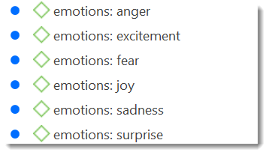
- Another option is to test whether different coders were able to distinguish between the codes of a semantic domain. For example, if you have a semantic domain called EMOTIONS with the sub codes:
-
The coefficient gives you an indication whether the coders were able to reliably distinguish between for instance ‘joy’ and ‘excitement’, or between ‘fear’ and ‘anger’. The cu-alpha will give you a value for the overall performance of the semantic domain. It will however not tell you which of the sub codes might be problematic. You need to look at the quotations and check where the confusion is.
Krippendorff’s Cu-alpha
- Cu-alpha is the global coefficient for all cu-alphas. It takes into account that you can apply codes from multiple semantic domains to the same or overlapping quotations. Thus, Cu-alpha is not just the average of all cu-alphas.
- If codes of a semantic domain ‘A’ have been applied to data segments that are coded with codes of a semantic domain ‘B’, this does not affect the cu-alpha coefficient for either domain A or B, but it effects the overall Cu-alpha coefficient.
- You can interpret the Cu-alpha coefficient as indicating the extent to which coders agree on the presence or absence of the semantic domains in the analysis. Formulated as a question: Could coders reliably identify that data segments belong to a specific semantic domain, or did the various coders apply codes from other semantic domains?
In the calculation for both the cu- and Cu-alpha coefficient, only coded data segments are included in the analysis.
How semantic domains affect ICA
ATLAS.ti supports ICA workflows using semantic domains (code groups or hierarchical coding structures). For example:
- A semantic domain called EMOTIONS might include:
- Joy
- Fear
- Anger
- Excitement
- Sadness
- ICA analysis can then evaluate whether coders consistently distinguished between these related codes. This helps identify:
- Ambiguous code definitions
- Overlapping concepts
- Coding inconsistencies within a code family
Why ATLAS.ti does not use Cohen’s Kappa
ATLAS.ti does not implement Cohen’s Kappa because of several methodological limitations identified in qualitative research literature.
According to the documentation, Cohen’s Kappa:
- Supports only two coders
- Assumes infinite sample sizes
- May produce misleading agreement values under certain conditions
ATLAS.ti instead focuses on Krippendorff’s Alpha-based approaches, which are considered more flexible for qualitative research workflows.
Common issues and mistakes
- Trying to calculate ICA in ATLAS.ti Web
- ICA is only available in ATLAS.ti Desktop for Windows and Mac.
- Not starting from the same Master Project
- All coders must work from the same Master Project. If coders create separate projects or independently add the same documents, ATLAS.ti may treat them as different entities.
- Using different ATLAS.ti versions or platforms
- All coders should use compatible ATLAS.ti Desktop versions. Mixing Desktop and Web workflows may cause duplication or prevent proper ICA analysis.
- Changing codes during coding
- Coders should not uploading or editing documents, rename codes, change code definitions, change code colors, or add new codes unless instructed by the project administrator.
- Using overlapping codes from the same semantic domain
- Codes within the same semantic domain should ideally be applied in a mutually exclusive way. If two codes fit the same quotation, split the quotation into smaller segments if appropriate.
- Trying to calculate ICA for image documents
- ICA currently supports text, audio, and video documents only.
When to contact support
Contact ATLAS.ti Support if:
- ICA analysis does not run
- Coders or documents do not appear in the ICA tool
- Project merging creates errors or unexpected duplicates
- ICA results appear incomplete or incorrect
- You are unsure how to prepare your project for ICA analysis
When contacting support, please include:
- Your ATLAS.ti version
- Whether you are using Windows, Mac, or Web
- A description of your ICA workflow
- Screenshots or error messages, if available