
How to use suggested codes in ATLAS.ti
Key takeaways
- Suggested Codes uses AI to recommend relevant codes for selected text segments.
- The tool supports both existing project codes and new code suggestions.
- Suggested Codes is available in ATLAS.ti Windows, Mac, and Web.
- You remain fully in control of which codes are applied.
Who this article is for
This article is for ATLAS.ti Windows, Mac, and Web users who want AI-assisted support during manual coding.
What are Suggested Codes?
Suggested Codes is an AI-assisted feature that recommends possible codes for selected text passages while you code manually.
Instead of automatically coding entire documents like AI Coding, Suggested Codes focuses only on the text segment you select.
The tool can:
- Suggest existing project codes that match the selected text
- Recommend new code ideas
- Help discover alternative coding perspectives
- Speed up manual coding workflows
Suggested Codes is designed to assist your analysis process, not replace your judgment. The AI suggests, but you decide which codes to apply.
Why use Suggested Codes?
Suggested Codes can help:
- Reduce time spent searching for appropriate codes
- Discover patterns or themes you may have overlooked
- Improve coding consistency
- Generate ideas for new codes
- Support exploratory qualitative analysis
The feature works especially well in projects with large code lists, where manually finding relevant codes can become difficult.
Use Suggested Codes in ATLAS.ti Windows and Mac
Create a new quotation with Suggested Codes
- Open a document.
- Highlight a text segment.
- Either:
-
Right-click and select Apply Codes
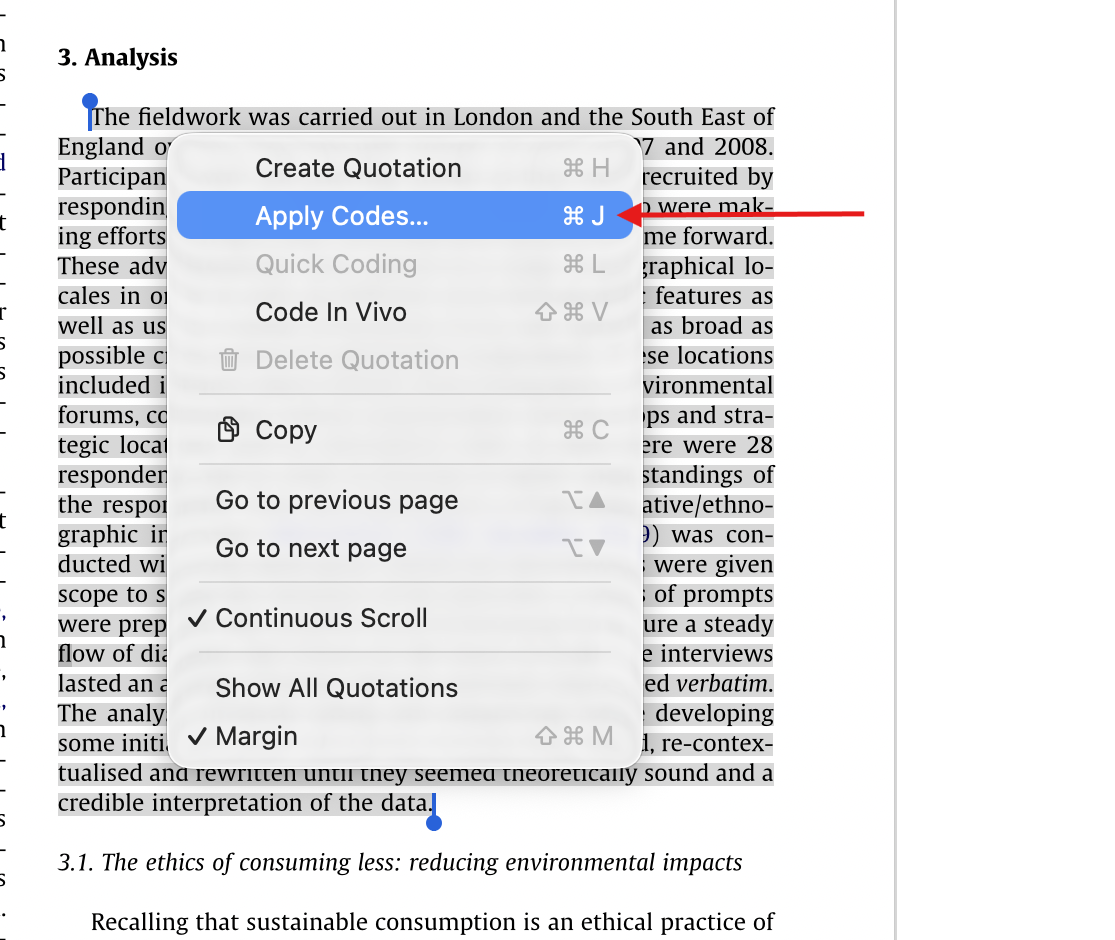
- Or use the shortcut:
Ctrl + Jon WindowsCmd + Jon Mac
-
- In the coding window, click Suggested.
- Wait a few seconds while the AI generates suggestions.
ATLAS.ti may suggest:
- Existing project codes that match the context (the "toggle" sign)
-
New code ideas based on the selected text (the "+" sign)
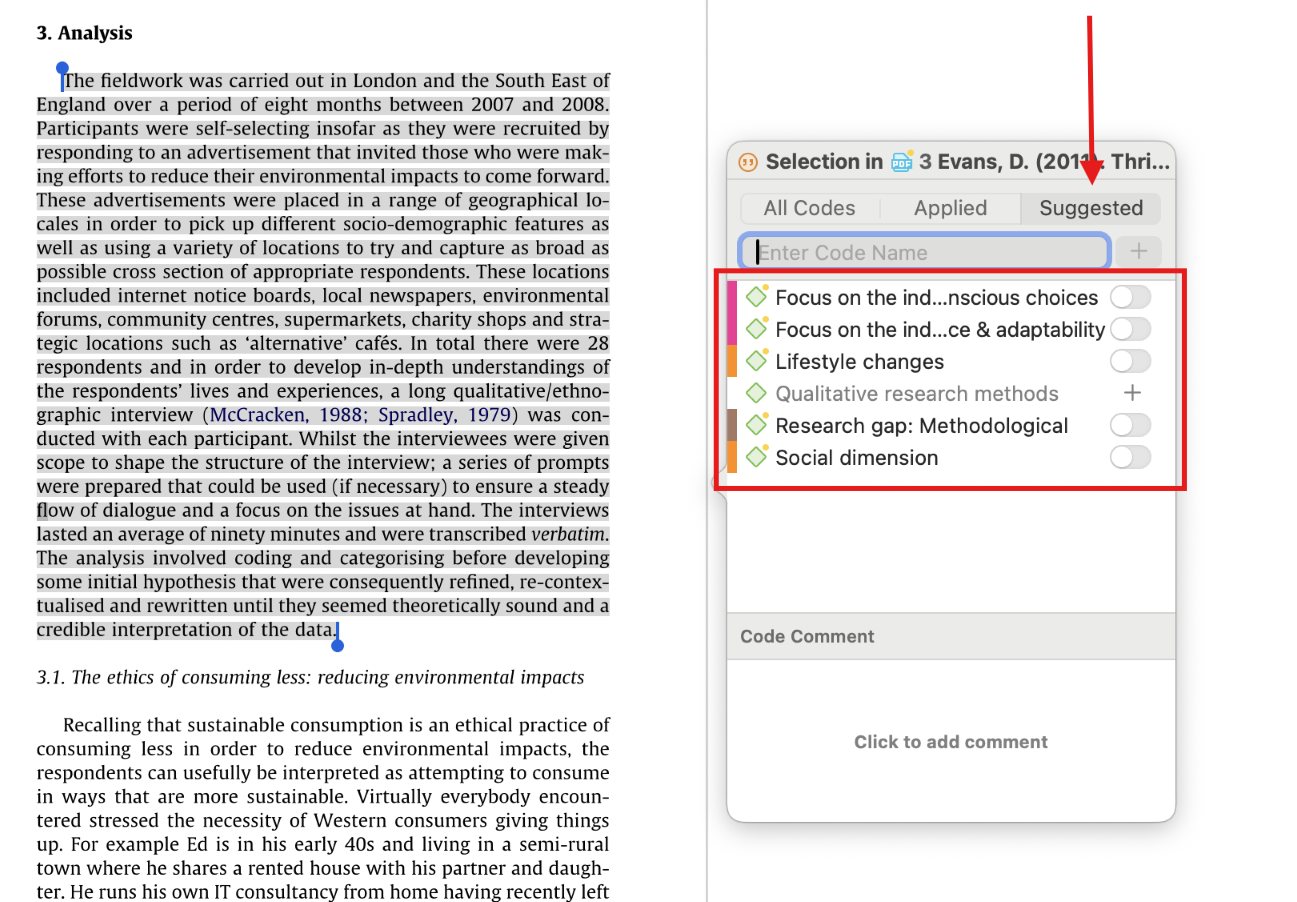
You can then:
- Select existing suggested codes
- Click the + button to create and apply suggested new codes
- Add your own codes manually
The selected codes are applied directly to the quotation.
Use Suggested Codes in ATLAS.ti Web
Create a new quotation with Suggested Codes
- Open the Document Manager.
- Open a document.
- Highlight a segment of text.
A coding popup window opens automatically.
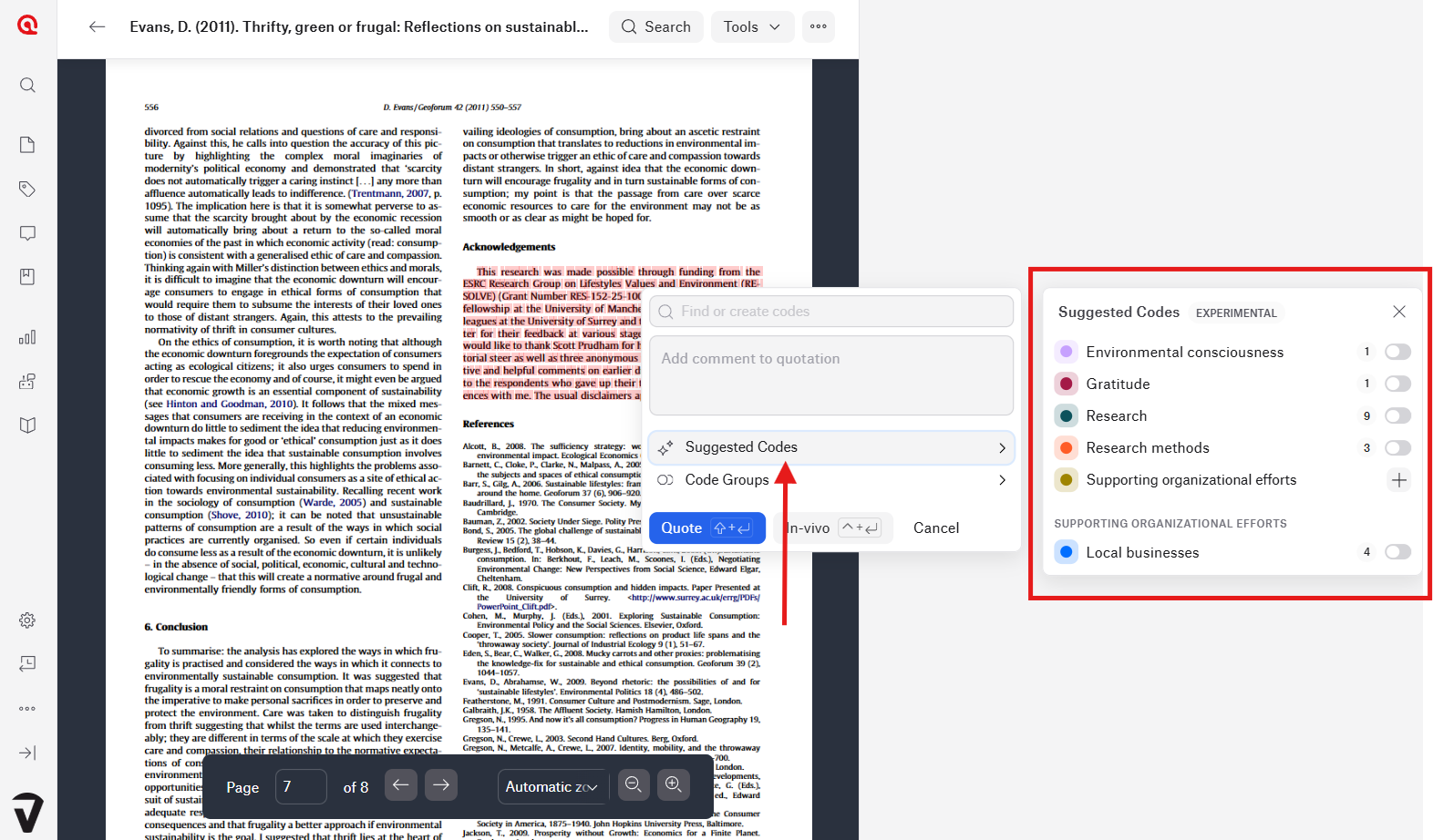
- Click Suggested Codes.
- Wait while the AI generates suggestions.
- Choose suggested codes by pressing the + button, or select one of your own codes in the same list.
- Click Quote.
Use Suggested Codes on existing quotations in ATLAS.ti Web
- Open a coded document.
- Click the vertical quotation bar in the right-hand margin.
- In the quotation popup, select Suggested Codes.
- Review the generated suggestions.
- Add or remove codes as needed.
- Click Done.
First-time setup and privacy notice
The first time you use Suggested Codes, just like with other AI Tools, ATLAS.ti will ask you to review and accept:
You must confirm the agreement before the AI features can process your data.
ATLAS.ti uploads relevant text content to ATLAS.ti and OpenAI servers only after you explicitly provide consent. OpenAI does not use ATLAS.ti user data to train its models.
How Suggested Codes work
Suggested Codes analyzes the selected text segment and compares it against:
- Existing project codes
- Semantic meaning and context
- Potential thematic patterns
The AI then suggests:
- Existing matching codes from your project
- New code ideas that may fit the text
This makes the tool useful both for:
- Structured coding with established codebooks
- Open exploratory coding
Important considerations
Suggested Codes is currently considered an experimental AI feature.
Because the feature relies on AI-generated interpretation, suggestions may occasionally:
- Misinterpret context
- Miss important nuances
- Produce inaccurate suggestions
- Reflect unintended biases
Researchers should always review suggested codes critically before applying them.
Common issues and mistakes
- Accepting suggestions without review
- Suggested codes should support your analysis, not replace researcher interpretation.
- Selecting text segments that are too broad
- Smaller, focused quotations usually produce more accurate suggestions.
- Expecting only existing codes
- Suggested Codes may generate entirely new code ideas if no existing project codes fit the selected text.
- Slow response times
- Because Suggested Codes relies on AI processing, delays may occur during periods of high demand.
When to contact support
Contact support if:
- Suggested Codes does not load
- The Suggested button is missing
- Suggestions never appear
- AI features remain unavailable after accepting the agreement
- Suggested codes cannot be applied