
How to use AI summaries in ATLAS.ti
Key takeaways
- AI Summaries automatically generate summaries of documents, codes, and groups using AI.
- Summaries are created as memos directly inside your project.
- You can summarize individual documents, multiple documents, codes, document groups, or code groups.
- AI Summaries are currently available only in ATLAS.ti Windows and Mac.
Who this article is for
This article is for ATLAS.ti Windows and Mac users who want to quickly summarize qualitative data using AI-assisted analysis.
What are AI Summaries?
AI Summaries use GPT-based AI models to automatically generate concise summaries of your project data.
You can create summaries for:
- Documents
- Multiple documents
- Codes
- Document groups
- Code groups
The generated results are stored as memos linked to the summarized entities.
How AI Summaries work
AI Summaries analyze text content from your project and generate a memo containing the summary.
For example:
- When summarizing a document, ATLAS.ti summarizes the document text.
- When summarizing a code, ATLAS.ti gathers all quotations coded with that code and summarizes them together.
- When summarizing groups, ATLAS.ti combines all included documents or codes into one virtual text before generating the summary.
The summaries are automatically saved as memos inside your project, where they can be edited, copied, expanded, or linked to your analysis workflow.
Use AI Summaries in ATLAS.ti Windows and Mac
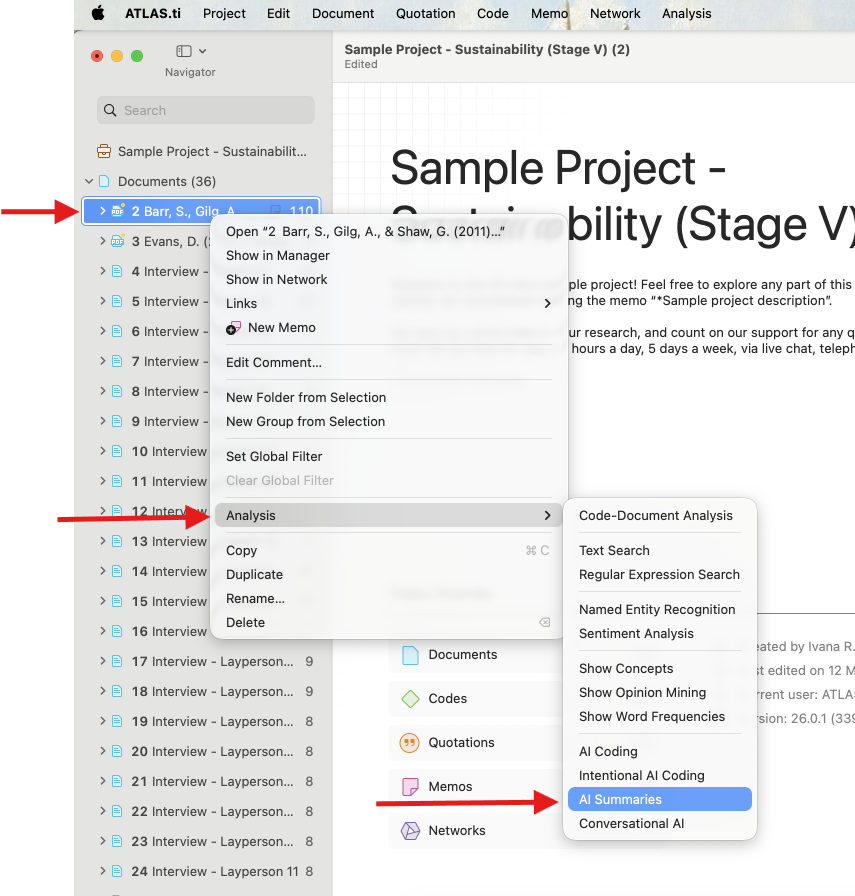
Method 1: From selected documents or codes
- Select one or more:
- Documents
- Codes
- Document groups
- Code groups
- Right-click the selection.
-
Select Analysis > AI Summaries.
Method 2: From the top menu
Windows
- Open the top menu bar.
- Click Search & Code.
-
Select AI Summaries.
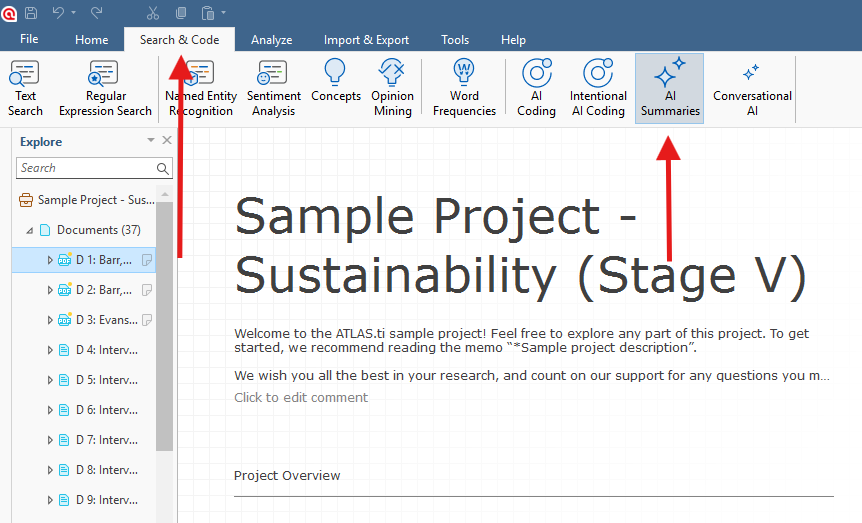
- Choose the documents, codes, or groups you want to summarize.
Mac
- Open the top menu bar.
- Click Analysis.
-
Select AI Summaries.
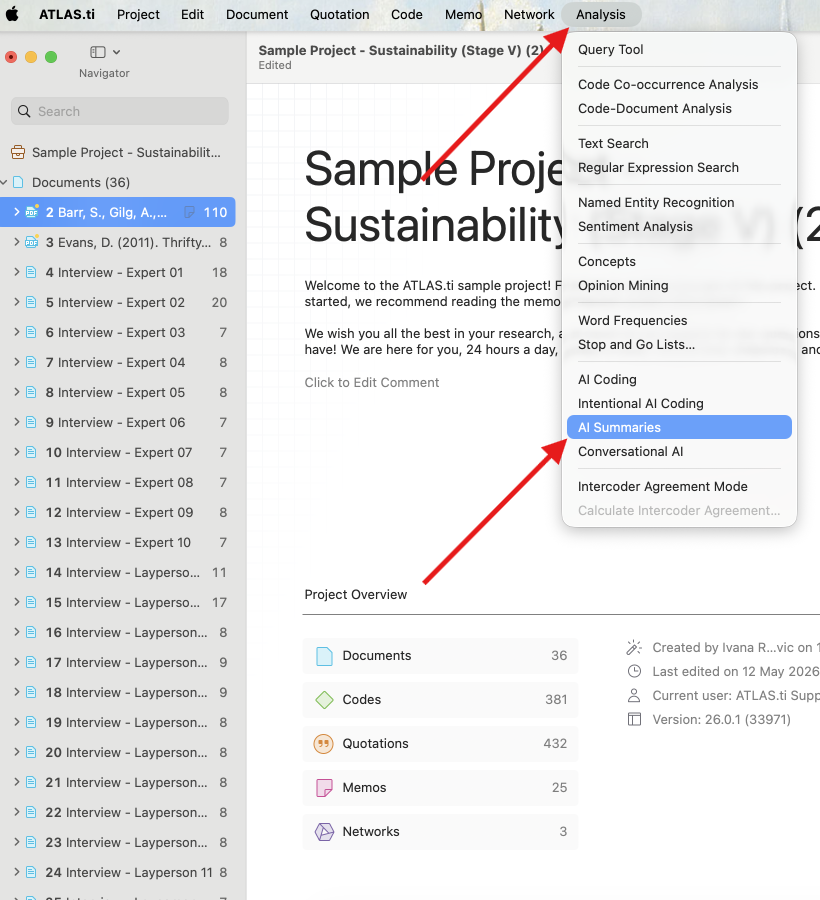
- Choose the documents, codes, or groups you want to summarize.
Review and save summaries
After the summary is generated, you will see the result in the same windows:

A memo is automatically created in your project - it is named based on the summarized item. You can then edit, rename, copy, and overall continue working with the memo in your project.

Summarizing codes and groups
AI Summaries can also summarize coded content instead of full documents.
For code summaries:
- ATLAS.ti collects all quotations attached to the selected code
- The quotations are combined into one virtual text
- The AI generates a summary based on those coded segments
This is useful for:
- Reviewing themes
- Summarizing interview topics
- Exploring coded patterns
- Creating quick analytical overviews
Group summaries work similarly by combining all included documents or codes before summarization.
Important considerations
AI Summaries only analyze text content.
PDF documents may sometimes produce weaker results because PDF text structure is not always interpreted correctly by computers.
Like other AI tools, generated summaries may occasionally:
- Misinterpret context
- Omit nuances
- Produce inaccurate or biased wording
Researchers should always review AI-generated summaries critically before using them in reports or publications.
ATLAS.ti only uploads data to ATLAS.ti and OpenAI servers after you explicitly agree to the EULA and Privacy Policy. OpenAI does not use ATLAS.ti user data to train its models.
Availability in ATLAS.ti Web
AI Summaries are currently not available in ATLAS.ti Web.
Common issues and mistakes
- Summarizing unrelated materials together
- Combining unrelated documents or codes can produce vague or inconsistent summaries.
- Using poorly formatted PDFs
- PDFs with unclear text order may generate inaccurate summaries.
- Treating summaries as final analysis
- AI-generated summaries should support analysis, not replace researcher interpretation.
- Forgetting summaries are saved as memos
- Generated summaries are stored as memos inside the project and can be revisited or edited later.
When to contact support
Contact support if:
- AI Summaries do not start
- No memo is created after summarization
- Summaries appear incomplete
- Processing becomes stuck
- AI Summaries options are missing