
How to use AI Coding in ATLAS.ti
Key takeaways
- AI Coding automatically analyzes text data and generates suggested quotations and codes.
- ATLAS.ti includes both regular AI Coding and Intentional AI Coding.
- Intentional AI Coding lets you guide the AI with research goals, questions, or hypotheses before coding begins.
- AI Coding is available in ATLAS.ti Windows, Mac, and Web.
- You can review, refine, edit, merge, or remove all AI-generated coding results.
Who this article is for
This article is for ATLAS.ti Windows, Mac, and Web users who want to use AI-assisted qualitative coding to speed up analysis and identify themes in textual data.
What is AI Coding?
AI Coding uses GPT-based AI models from OpenAI to automatically analyze text documents and generate descriptive or inductive codes based on the content of your data.
AI Coding can help researchers:
- Save time during initial coding
- Identify recurring themes and patterns
- Generate quotations automatically
- Organize large datasets
- Create starting points for deeper analysis
The AI does not replace the researcher. You remain fully in control and can review, refine, edit, or delete any generated quotations or codes.
AI Coding vs Intentional AI Coding
ATLAS.ti includes two related AI-assisted coding tools.
AI Coding
Regular AI Coding automatically analyzes your documents and generates codes based on the content of the data.
This approach works well when you want:
- Exploratory coding
- Initial theme discovery
- General inductive analysis
Intentional AI Coding
Intentional AI Coding is a guided version of AI Coding. Instead of immediately generating codes, ATLAS.ti first asks for your research goal, question, hypothesis, or analytic focus.
The AI then generates:
- Suggested analytic questions
- Code categories
- Related coding structures
You can review, edit, remove, or add questions before the coding process begins.
Intentional AI Coding is useful when:
- You already have clear research objectives
- You want coding aligned with a specific topic
- You want more control over the AI analysis
Use AI Coding in ATLAS.ti Windows and Mac
Method 1: Start from selected documents
- Select one or more documents or document groups.
- Right-click the selection.
- Select Analysis.
- Choose:
- AI Coding
-
Or Intentional AI Coding
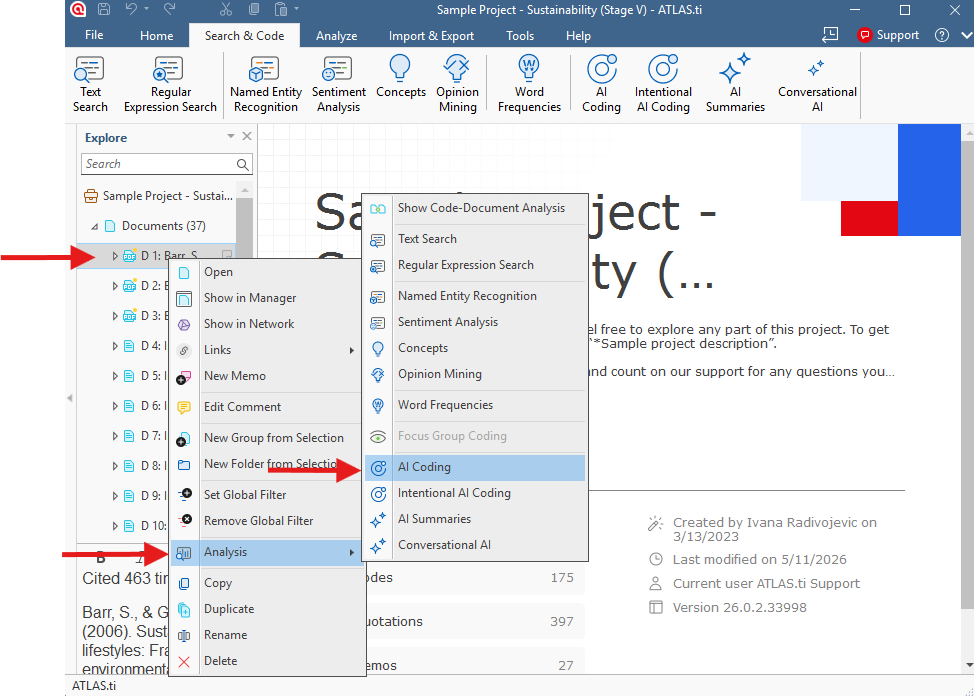

This method immediately starts the workflow using the selected documents.
Method 2: Start from the top menu
Windows
- Open the top menu bar.
- Click Search & Code.
- Select:
- AI Coding
-
Or Intentional AI Coding
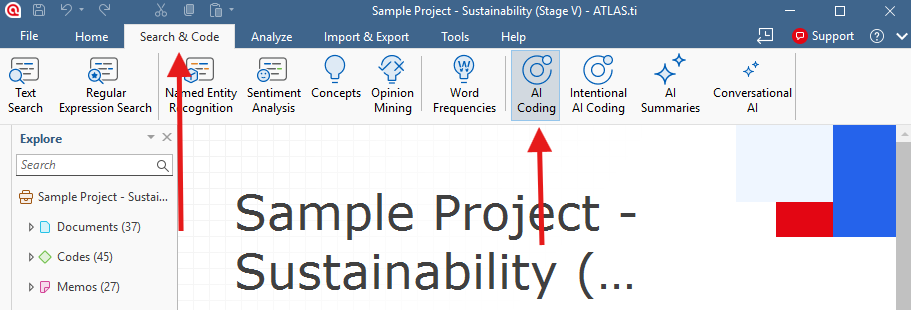
- Select the documents you want to analyze.
Mac
- Open the top menu bar.
- Click Analysis.
- Select:
- AI Coding
-
Or Intentional AI Coding
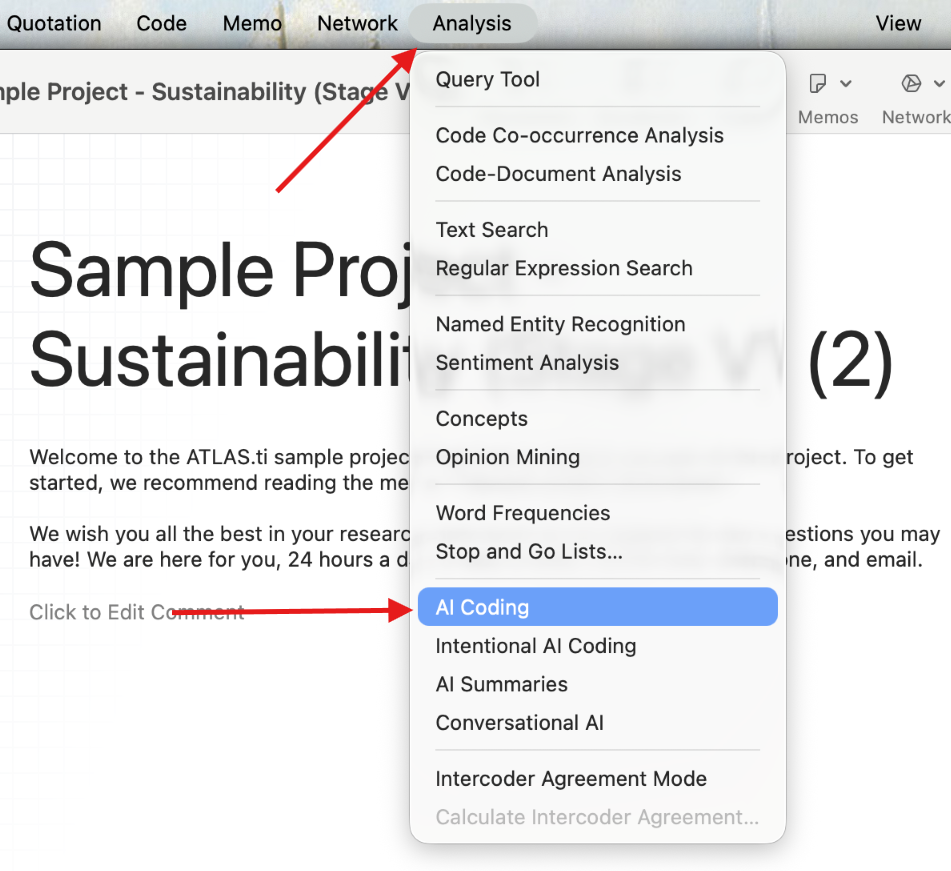
- Select the documents you want to analyze.
Use intentional AI coding in ATLAS.ti Windows and Mac
Intentional AI coding helps guide the AI toward your specific research goals. Instead of only generating codes from the document content, you can provide additional context, research questions, or analytical directions before coding begins.
You can access intentional AI coding the same way as regular AI coding:
Windows and Mac
Either:
- Right-click selected documents and choose Analysis > Intentional AI Coding
- Or use the top menu:
- Windows: Search & Code > Intentional AI Coding
- Mac: Analysis > Intentional AI Coding
After selecting intentional AI coding, a new window opens where you can enter your intentions for the analysis.
You can include:
- Research questions
- Analytical goals
- Study background or project context
- Specific topics or themes you want the AI to focus on
- Theoretical or methodological approaches
For example:
- “Identify barriers to sustainable behavior”
- “Focus on emotional responses to climate change”
- “Generate codes related to trust, responsibility, and environmental concern”
The AI will use this information to generate suggested questions and code categories for the coding process.
You can then:
- Review generated questions and codes
- Add or remove questions manually
- Select or deselect code categories
- Refine the generated structure before coding begins
When ready:
- Click Next (Windows)
- Or Revise Questions and Codes (Mac)

Then select Start Coding.

Once the coding is complete, you can review the results before applying them to your project. Just like with regular AI coding, you can manually deselect codes or quotations you do not want to keep.
Review AI coding results in ATLAS.ti Windows and Mac
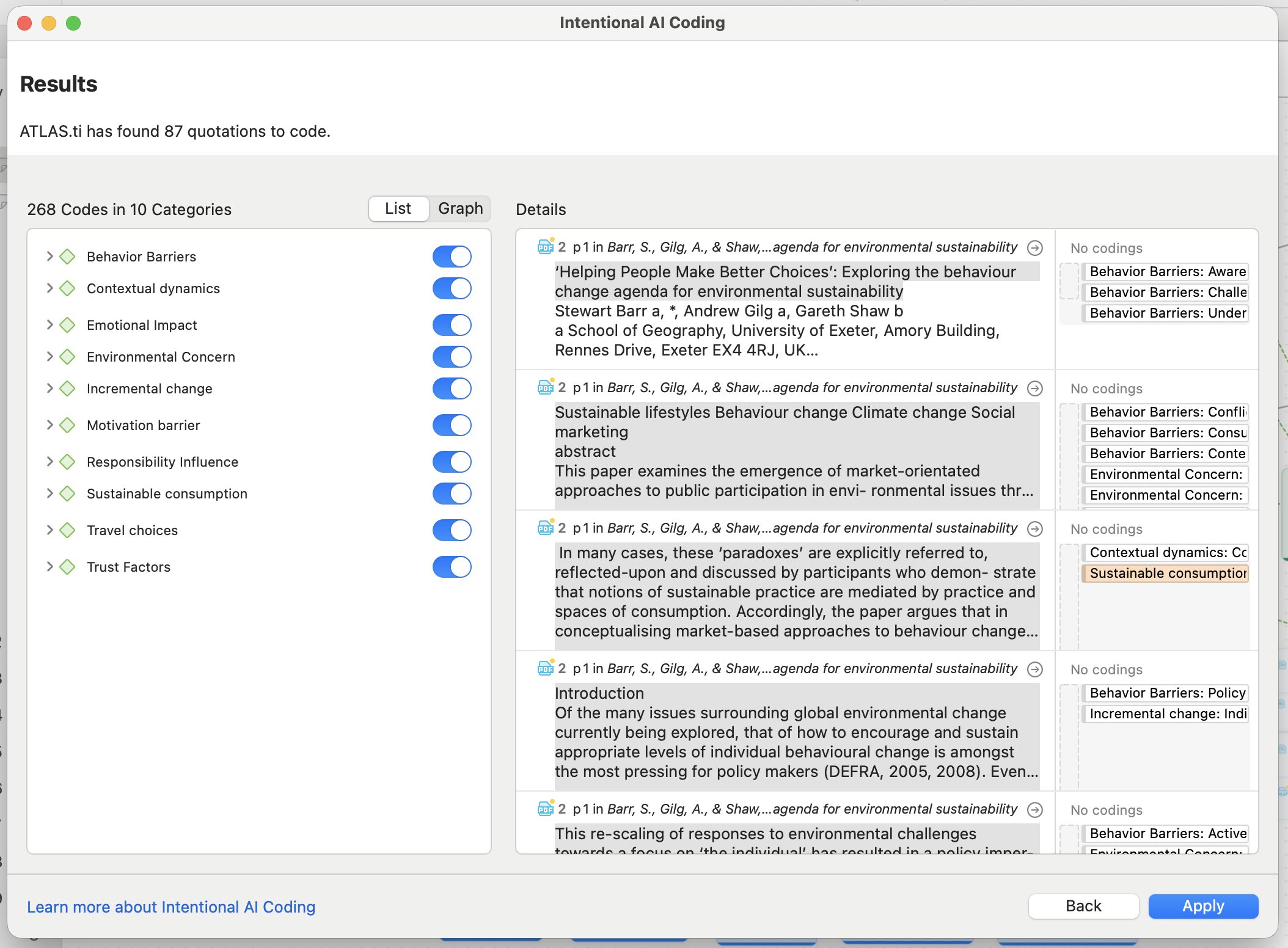
After AI Coding or Intentional AI Coding finishes, ATLAS.ti displays the generated results for review before applying them to your project.
The results can be viewed as:
-
A list
-
A graph visualization
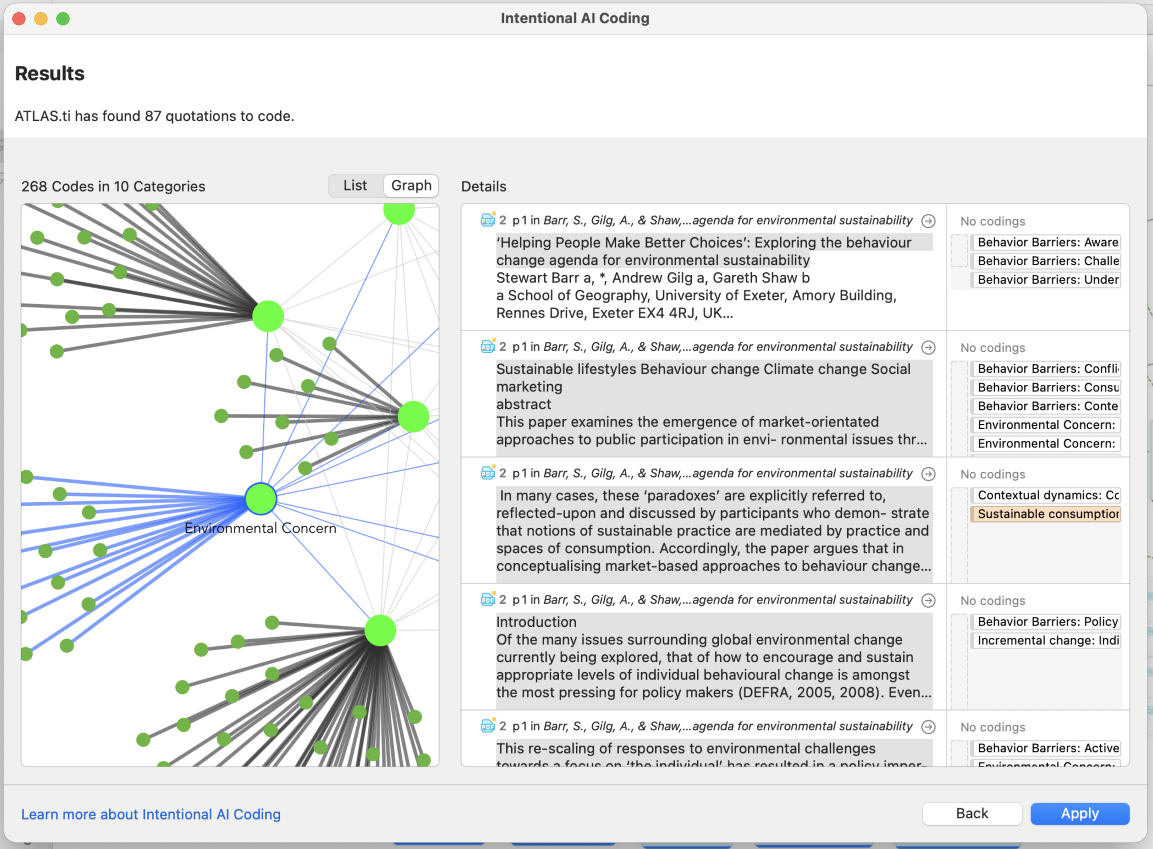
You can:
- Review generated quotations and codes
- Select or deselect codes you want to keep
- Remove unwanted coding results before applying them
- Switch between graph and list views
With regular AI Coding, you can also adjust the number of generated code categories using the category slider before applying the results.
Intentional AI Coding does not include the category slider, but you can still manually review and deselect generated codes and categories before applying them.

Once you are satisfied with the results, apply the coding to add the quotations and codes to your project.
Use AI Coding in ATLAS.ti Web
Start AI Coding
To analyze multiple documents:
- Open the Document Manager.
- Select your documents.
- Click the three dots menu.
- Select Tools > AI Coding (+ Intentional).

To analyze a single document:
- Open the document.
- Click Tools > AI Coding (+ Intentional).

How Intentional AI Coding works in ATLAS.ti Web
ATLAS.ti Web integrates Intentional AI Coding directly into the AI Coding workflow.
After starting AI Coding, you can:
- Enter a research goal
- Describe your research question
- Add study context or objectives

The AI then generates suggested questions and code categories to guide the coding process.
You can:
- Edit generated questions
- Add your own questions
- Remove questions
- Rename code categories
Whenever you are ready, just press Next for the Intentional AI Coding to start:

If you click Skip instead of entering a research goal, ATLAS.ti Web proceeds with regular AI Coding without guided intentions.
In ATLAS.ti Web, saving the results as a view makes it easier to revisit and refine the generated analysis later.
How AI Coding analyzes data
AI Coding works paragraph by paragraph and only analyzes the plain text of your documents. Existing formatting, quotations, images, and manual coding do not affect the results.
ATLAS.ti automatically:
- Splits text into manageable segments
- Identifies meaningful themes
- Generates descriptive codes
- Groups related codes into categories
Intentional AI Coding adds another layer by applying your research questions to each segment during the analysis process.
The software uses clustering methods to group similar codes together and reduce unnecessary duplication.
Tips for better AI Coding results
AI Coding works best when:
- Documents belong to similar themes
- Paragraphs are clearly separated
- Interview questions appear in separate paragraphs
- Documents contain clean, well-structured text
PDF documents may produce weaker results because paragraph structures are often unclear.
AI Coding also skips very short paragraphs.
Important considerations
AI Coding is intended to support qualitative analysis, not replace researcher interpretation.
Large language models may occasionally:
- Misinterpret context
- Produce inaccurate labels
- Reflect social biases or stereotypes
Researchers should always critically review AI-generated coding before using it in publications or final analyses.
AI Coding uploads document content to ATLAS.ti and OpenAI servers only after you explicitly agree to the EULA and Privacy Policy. OpenAI does not use ATLAS.ti user data to train its models.
Common issues and mistakes
- Using unrelated documents together
- Combining unrelated topics in one AI Coding run can reduce coding quality.
- Uploading poorly formatted PDFs
- PDFs without clear paragraph structure often produce less reliable coding.
- Accepting AI coding without review
- AI Coding should be treated as a starting point for analysis, not as finalized results.
When to contact support
Contact support if:
- AI Coding does not start
- Documents fail to process
- Generated quotations are missing
- AI Coding tools are unavailable
- Processing becomes stuck or unusually slow